TonyE
Staff Pukes
-
Joined
-
Last visited
Everything posted by TonyE
-
Don, if you are still having your issue with 2023.002, please post that up as a new issue. I could not and still cannot reproduce Eric's issue when I used just the two listed ExportDLLs.
-
-
HC 2023.002 fixed in the GE
-
-
GE entered messages fixed for 2023.002 SE is still broken at the moment, no crash but the messages don't show in the GE.
-
-
-
Can you try again with fewer ExportDLLs? I was able to load the saved game with AutoSaves and GroupIdManager enabled. Logging begins. Version = 2023.001, Build Date = Mar 30 2023, Build Time = 14:53:52 Windows Version = 10.0 (22621) 0 winmain.c:321 - Iterative saving GameTime activated. Save every 1 game seconds. Saves before overwriting=255 0 winmain.c:355 - BattleSet Specified: 26 0 winmain.c:414 - Saved Game Specified: C:\Games\HC\2023.001 Update Saved Game Load Crash\Test 3-75.hpq 0 winmain.c:440 - Database RES Specified: C:\Games\HC\2023.001 Update Saved Game Load Crash\commondb.res 0 winmain.c:496 - Game Options Specified: 011111110 0 winmain.c:553 - done processing arguments. Activating logging for: 0 winmain.c:557 - ac_ai 0 winmain.c:573 - load 0 winmain.c:607 - GE is C:\Prog\Projects\HC\GE\Debug\Winharp32.exe 0 DLLExport.c:273 - ExportDLL Loaded: AutoSaves.dll Interface Ver: 34 DLL Ver: 2 DLL Desc: AutoSaves Manager DLL by Tony Eischens 0 DLLExport.c:273 - ExportDLL Loaded: GroupIdManager.dll Interface Ver: 34 DLL Ver: 9 DLL Desc: lazarus Testbed for creating and auditing group ids by Tony Eischens
-
-
-
-
-
-
-
-
-
-
HCE - 2023.001 - 2023-03-30 =========================== - Chg:00000 GE Incremented ExportDLL interface version to 34 for HarpoonEvent uuid addition. - Chg:00000 GE Incremented ExportDLL interface version to 33. - Chg:00000 GE ExportDLL added GroupAllocated call which notifies ExportDLLs when the game has allocated a HCGroup structure and populated some of the fields. Of note, UUID is populated. - Chg:00000 GE Added in Malacca Straight BattleSet identifiers separate from hdsu.rsr. MSBS is BattleSetNumber == 32 and .SCw, .hpw for scenario and saved game files. BattleSet files are hdsr.res and hdsr.rsr - Chg:00000 GE Saved game version incremented to 0x3480321A for HarpoonEvent structure changes. - Chg:00000 GE Scenario file version incremented to 9 for HarpoonEvent structure changes. - Chg:00000 GE Adding uuid to HarpoonEvent structure to allow us to uniquely identify HarpoonEvents. - Chg:00000 GE Modified MessageEvent to add side attribute - Chg:00000 GE AirAttacker in Combat5.c was occasionally asking aircraft to attack torpedoes. Code has been added to short-circuit out of AirAttacker in this case to avoid the assertion error. The problem evidenced itself as an assertion error "type_aa != INVALID_ATTACK_CODE" We'll see if the root cause that decided launching aircraft to attack torpedoes is ever found... (thanks donaldseadog) - Chg:00000 GE CheckAirUnitWeapons in effect4.c was letting aircraft use their internal guns to fire at torpedoes (see immediately above), this has been corrected so that internal guns are not considered valid against torpedoes. This should fix the root problem. (thanks donadseadog)
-
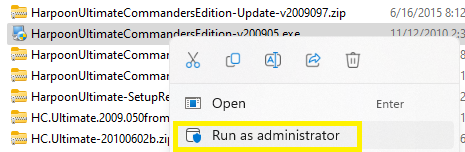
Please try running the installer with administrative permissions. I would also make sure to install the most recent patch after that installation. https://ftp.matrixgames.com/pub/Harpoon-UltimateEdition/HarpoonUltimateCommandersEdition-v2022027.zip I'll reiterate that once you have the game installed, you shouldn't need to reinstall, that's almost always a waste of time for HC. Thank you for the patience!
-
We made it home safely yesterday. I'll leave you with an ASAT missile, go F-15!

-
-
Oh, and what version of the game are you using?
-
If you would be so kind, please zip up your scenario file, commondb.res file and bonus points for pfData2005.mdb and post the zip file here. For future reference, an uninstall + reinstall is hardly every needed. There are clean copies of the 'compiled' database files in the commondb.bak directory and clean copies of the PE and its data file in PE.bak.
-
Up the nose photo of my second favorite aircraft

-
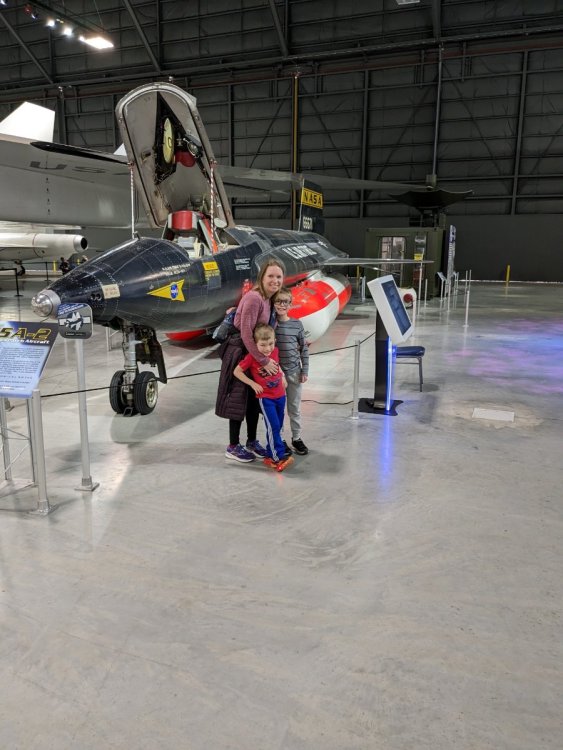
The boys were all about the fastest and enjoyed seeing the progression from the 42mph 1909 Wright Military Flyer to the X-15 at 4520mph.