




eeustice
Members
-
Joined
-
Last visited
-
I have sent a message to TonyE who is the HUCE master and programmer. He is also available to message on the HarpGamer Discord Chat Room. .
-
HUCE no runs on 64bit computers. The link to upgrading your HUCE is attached. This will take you to the latest version of Harpoon 2025.025. https://www.harpgamer.com/downloads/HC2025.025_ComprehensivePatch.zip HUCE has Access Runtime as part of the install. This will allow you to open the Platform Editor (PE).
-
Try downloading HCDB2 from HARPGAMER and install a fresh copy. See if that fixes your problem. HCDB2 will nor work with the Scenarios that come with HUCE. The official db for HUCE is HCDB-250724 (1980-2015 era). Here is the link: https://harpgamer.com/harpforum/files/file/235-hcdb-250724-1980-2015-era/ You can join us in the HarpGamer Chat Room in Discoed if you would like. Eric
-
Steve, The db HCDB2-170909 you are trying to load is a Harpoon Commander Edition d. It may not be compatible with Harpoon 3. Eric.
-
I am currently running 2025.025 on my laptop, and are not having any issues. I opened the SE twice reversing the order of the files when I opened them. There were no issues. I don't have my main computer. It's at the new apartment. I am running 2025.024 on that PC. I will check the first chance I get. Tony, I wonder if that was when you had me switch which version of the SE I was using from the download.. The problem went away after that if I remember correctly.
-
Noticed something interesting on this issue while playing my scenario. If you let the GE launch missile at the same missile group that I tried to shoot at, it will launch missiles at the target. What is the difference between what the played and the GE launching missiles? How is this possible?
-
I tried using DonT's AI Box to destroy a missile group that I couldn't launch missiles at. When just selecting the unit in the AI box the GE crashed. I tried to uses a small scenario to duplicate the issue to no anal. I tried removing groups from the current save game by using DonT's AI Box and was unable to duplicate the issue.
-
I am wondering if this issue is related to TonyD's Red side missile issue. When attempting to attack Red missile group XuM I am unable to select it as a target. The target missile group has 36, KH-101 ASuW missiles in it. The is on the northern part of the map up by Petropavlovsk, Russia When attempting to attack the missile group I am unable to select it as a target for Air-to-Air missiles. It doesn't register as a target. I can select the missile group with the mouse and see it's Group ID and get the missile groups info in DonT's AI window. In the opening screen of the saved game the unit Window shows the location of XuM, I'm not sure if the issue are is, however after running TonyD's test scenario I feel that they are somehow related. I have seen the missile issue before where I couldn't attack missile group and then later on in he game I was able to attack the group successfully when it got closer to it's target. Let me know if you have any questions or need any additional info. The latest edition on my Fictional db is included in the Zip File. HC Issue.zip
-
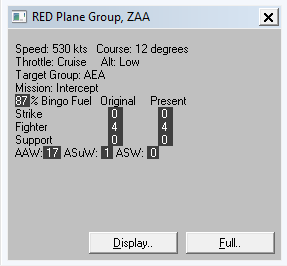
Issue Verified. WestPac Battleset Ran the test scenario and received the same results each time. In my run of the scenario Red air-group ZAA had 33 Air-to-Air weapons. After launching 8 missiles which Dont's AI Tool lbox verified there were only 17 Air-to-Air weapons left. Missile group ZCM shows 8 missiles in the AI Tool box. I ran the test multiple with GE2025.025 and with Export.dll's active. If any additional info is needed, please let us know.
-
-
Unable to reproduce issuein2025.024 or 2025.025.
-
-
-
-
