




TonyE
Staff Pukes
-
Joined
-
Last visited
Everything posted by TonyE
-
Hmm, there should not be a crash, can you zip and attach your commondb.res file and let us know which plane to use? Then I can hopefully see why the SE is crashing and perhaps fix that.
-
Correct effect4.c CheckGroupECM you can see the ECM modifier by turning on ECM logging in which case you will get entries like... ECM Point Defense ECM=20 Defender=F-16C
-
Missile DATA is set to 0.5 in Combat3.c Also in Combat3.c we have AirToAirResolution. 1. The difference in ATA is calculated, diff = attackerATA - targetATA 2. If diff < -2.0 then PH is set to 5. If diff < -3.0 then PH is set to 1. Otherwise, PH is set to diff*10 + 30. 3. If target is fast, subtract 30 from PH 4. If target is small (VSMALLAIR), subtract 10 from PH 5. If target is vLOW, subtract 10 from PH (yes, these are cumulative, you could very well have a negative PH by this point) You can see the end result by turning on missile logging, you will get entries like... "AirToAirResolution Ph: 30, Roll: 40" which would be a miss since 40 >= 30. The die roll must be lower than the PH for a hit.
-
-
Agreed on minimize and maximize. Once I dig back into this ExportDLL's code, I'll modify the window management. The big number has no meaning. For a while I was modifying the game to use meters but removed the code from the game but not the ExportDLL so you see that non-sensical altitude. I'm not sure when I'll work on the ActUnitReport code, probably not in January. What do you most want to see this one do?
-
-
Nice conversation guys :). I agree that ideally one would have electronic warfare gear as part of the loadout and zero out the aircraft level entries. However, if there is a value in the aircraft level ECM entry, it will be used. If the loadout ECM value is greater than the plane's, then the loadout ECM value will be used. On a single plane, there is only one ECM strength value (i.e. they are not combined); however, two planes both doing standoff jamming will be better than a single plane doing standoff jamming. I'll also point back to the following for additional information.
-
-
-
Here is a very old tutorial video that may help, https://youtu.be/4yHAXxGep6w?si=FyQvmnKJc6Tx3mIe .SCv indicates the Middle East BattleSet Understanding HC/HCE File Names - Frequently Asked Questions (FAQ) - HarpGamer For "China in the Horn" you will also need to grab the HCDB2 database. HCDB2-170909 (1980-2025) - Databases - HarpGamer You picked a challenging start in terms of game setup ;). It is entirely too difficult to load scenarios that don't come with the game, making it easier is one thing on a very long list of things to improve.
-
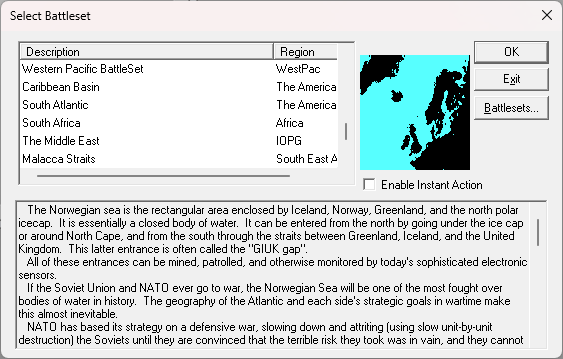
Welcome, if the game is taking you automatically into a scenario, go to File\New then answer Yes to quitting your current game. You should then see the list of BattleSets when you choose one of those (a few of them do not have built in scenarios, give Western Pacific BattleSet a try) and click OK. At that point you should be shown a list of the built-in scenarios for that BattleSet. Does that help?
-
Once again the Holiday Sale is on! Larry Bond's Harpoon - Ultimate Edition - Game - Matrix Games 84% discount
-
-
I voted for some other situation. If the home base from which I took off is damaged to an extent then plane can't land, I'm good with the logic auto-choosing another one in the same group. However, there is no suitable home plate in the group, then I'd like to be prompted to select a new one (with an indication of whether I have enough fuel to get there or not).
-
Nice find
-
Thanks for reporting, I can't say I have even tried the DLL in years. Harpoon is a hobby for me and I unfortunately won't be able to take a look for at least a week. In the interim, you can disable the ExportDLL by renaming it with a different file extension (my favorite is .dll.bak) or delete it outright.
-
I didn't get much time into this tonight. I am only doing Exports from the PE. 1. Exported DB, copied annex_a1.csv and annex_magsEx.csv to a separate location for later comparison as annex_a1_Export_01.csv and annex_magsEx_Export_01.csv. 2. Exported DB again without changing anything in the PE. Copied annex_a1 and mags again this time as Export_02. 3. Compared the csv files, no changes. So this at least means the export isn't totally random. 4. Added one item to the first ship's magazine (an ordnance pallet to the end of the magazine list entries for ship id 2048 wielingen. 5. Exported DB, copied a1 and mags to Export_03. 6. Compared the 02 files to the 03 files, the renumbering in a1 makes total sense, magazine inserted and magazine numbers adjusted. magsEx did not make sense, ordering seems all messed up.
-
Thanks much Don, I'm hoping to finally take a good look this weekend.
-
Correct, at time of export?
-
Another tool at your disposal is looking at the commondb\res\annex_mags.csv to see if it is staying the same across exports.
-
Ugh, so not deterministic, that's going to complicate things. Can you type out your steps so that someone can try to reproduce?
-
Thank you for the additional information, one more question so far, do you only export from the PE or do you do both export and import actions/buttons?
-
To the question of whether the PE running under the Access Runtime can view the # of magazines, the answer is yes.
-
Enrique, do you have a before the issue db and one as soon as you noticed that you can zip and send to me tonye@harpgamer.com? Any additional hints are appreciated too (like that you only export and never import if that's how you work).
-
In the game there are: Torpedo Sub-Types: (these are stored in the F1 annex Guidance field so 66 = 'B', 78 = 'x', etc.) 'B' - Active/Passive seeker '2' - Double-wire guided None 'P' - Passive Seeker '1' - Single-wire guided 'S' - Straight-running Unknown 'X', 'x' - Wake following, term active 'A' - Active seeker (this one is not in the default PE for some reason) Torpedo Codes: DE Payload Quiet



