Grumble
Members
-
Joined
-
Last visited
Everything posted by Grumble
-
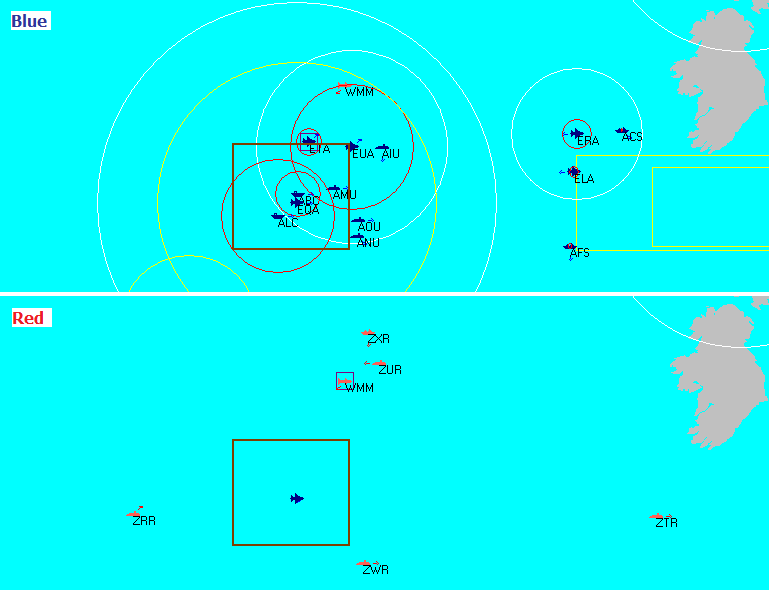
Knowing I suffer for a purpose, even if it's malicious , would make it much better. And just a sentence in the scenario background, even a wink like "the BG has scattered to avoid migrating whales" turns recovering the formation from nuisance to mission. But few times the formation looks just random, like after setting starting points, alternate routes, missions, speed, patrols, ordinances, writing orders, red and blue, etc., etc. the designer just clicked ships into the main body and did not zoom in to tidy up. This gives me the itch ... to tidy up. Then there is HDSC 10.0, kind of unique, the formation here is obviously set piece, but there is no apparent tactical advantage this arrangement provides, or any way a reasonable naval formation can evolve into this, whatever whale migration. No inner screen for the carriers, even the closest Tico is too far away to protect from ASMs, AOR ships in picket position, looks nice though.
-
I have this aching desire, recurring at the start of most HDS scenarios, to be able to set initial formations. I feel I should be able to rearrange my battlegroup, main body, ASW pickets, etc. freely at 0 time, under 0 time. In the real World the commander sets the formation soon after the BG leaves port. In the game I'm promoted to commander on the spot, just few minutes before the battle start. Ok, this happens, but not all the time. What aggravates this (for me) is that the previous commander has very different idea about ASW formations (if he had any at all ) I have only minimal control over the station keep speed of my ships. Either I stop the group and wait until ships creep, 5kts, to station, or I start the group and let the captains fool around at flank speed. One painfully eats into the game time limit, the other is a Russian-roulette if opfor subs are around. We also have the main body station keep problem, there is a good chance that main body ships, once I change the initial formation, converge on a single spot. (After reaching their stations.) Even if you spend time on formation setup you don't get results. My ideal ASW formation for CVBG transit. (Edited: for the IOPG battleset, Indian Ocean specific sonar characteristic, like limited range, virtually no CZ detections, etc.) Fixed wing ASW patrols 40-55nm out. Any further out or wider patrol ring leads to a too scattered sonobuoy pattern, subs slip by too easily. The more assets I've the more sectors I patrol left/right from the PIM. Heli ASW patrols 30-40nm. The advantage of helicopters is that these exhaust their endurance and sonobuoy assortment roughly the some time. An S-3 patrols for hours after it has laid all of it's buoys. The helis provide safety in the gap while the S-3 has only MAD to work with. Towed array ASW picket 20-30nm out from the HVU. Perry or Spruance. The Spruance is best paired with an AAW cruiser or at least a CF Adams to protect it from pop-up missile attacks. I use the AAW ring or the main body for the picket. Avoid the ASW ring, my sprint-drifting pickets have never detected anything but torpedoes. And I don't want to detect a Type-65 any more. The HVU ideally escorted by a VLS Tico sporting a towed array. Ok, I'm not gonna get the free formation feature in the GE anytime soon, slightly better outlook for an ExportDLL, who knows. But for the resolute there was always the option of modifying the Battleset scenario with the SE, set formation and play it as User scenario. This was as far as I got, theory, until I came by HDSC 10.0. Clash of the Titans, yum. There is a beautiful blue CVBG, all-mighty airwing, Spruances, Ticos and the Long Beach too, muahhahhaaaaaa ... except the formation is all over the Arab sea, 120nm E-W 100nm N-S!! I will have order here! Come SE, the only hard part is to open the scen and find AAC group without blowing away the red positions. Great. The added benefit, that the positions set in the SE the ships (all of them in the main body) keep without a flinch! The modified scenario file is attached below. CVGB in full ASW sweep. HDSC10.zip


-
Yep, Windows 7 Professional, Enterprise and Ultimate versions include "Windows XP Mode" which runs under the built-in Windows Virtual PC, link to the MS guide: Install and use Windows XP Mode in Windows 7 I run the SE this way myself.
-
Hi Tony, hope you do fine. is there anything more to this new beta release that can be shared? It was a pleasant and unexpected surprise this morning to find it here, even more so that it is an actual fix. How come? thanks, Grumble
-
Is the AI able to perform BOL attacks? It's HDSA, two blue carrier groups have air superiority over the Atlantic, all units in the CVBG groups are passive, AEW and fighter CAP is up, radar is clear but a pair of Shipwrecks is still coming in. The scenario is almost over anyway so I checked (with turncoat) how did red get firing solution, I was sure a sub has slipped by the ASW screen, but no, red subs are all outside even of CZ range, the only contact red has on blue is the ESM detection of the AEW Hawkeye. Did the AI fire it BOL?? If anyone interested the attached savegames are 80.hpf, blue save after detection 80bda.hpf, save switched to red side 80pre.hpf, last iter save some 4 minutes before detection 080.zip
-
Has anyone played HDSA recently? Like with the 102 build, probably 097 is the same. This is vs red subs in the Atlantic. I just played through the first two battleset scenarios as blue, haven't got single sonar contact (or torpedo up mine), only Keyhole reported some. I know the pond is big but probably the scen designer had something else on his mind but a nav exercise. I just haven't had the heart to check with show-all if it is the sub-stopping issue back from the grave. Now that Tony is not around to exorcise anytime soon.
-
Faced the same in Bass Drum. Though that was an SA-6, but it had like 90% Ph on HARMs. Looked invincible. The solution was to post a Growler on the same bearing. Disrupts SAM guidance nice. Disruption looks good too, instead of pH penalty ECM actually disrupts guidance. The SAM flies on but does not track. I played around with this in God mode a little, switching sides back and front, what happens is that my ECM jams the radar (illuminator?) so the radar contact (my HARM) is intermittently degraded to an ambiguity circle and then the SAM tracks just the center of the circle, so it misses the HARM unless they are able to reestablish contact very soon. Important that the center of the ambiguity circle is not moving in CMANO, i.e. it's location is not tied to the actual contact. One of my long time wish list items for Harpoon too. On the downside the SAMs do circle back for target if contact is reestablished, I don't think even command guided ones can do that. Well, a sophisticated model yields sophisticated complications. Yes (sigh) but with it's leaner model Harpoon was (is, I hope) better positioned to develop a potent AI in this respect too.
-
-
hi David, pretty much what the others already said, what I thought to add is the "Why?" and background. I was thinking how much of what Eric or Tony or I would describe is actual carrier air defense "experience" and how much is that we by now learned to "game" the game. So the points which an actual battlegroup commander could probably put to some use are: As said, you want to keep your ship radars off as much as possible. This is because active radars can be detect with ESM gear over a much greater distance than the radar's actual detection range. By going active you are giving away your ship's position (or bearing at least) to enemy air units beyond your radar range. Even our game AI might just fire few AS-6-es down a bearing to see if there are any takers. On the other hand SAMs do need directors, so if it's already raining Kingfishes, light up your Ticonderoga & co. Yes, you want the bombers not the missiles. Set up your AEW radar screen and fighter CAP at distances from the main group so you can intercept bombers before launch. Generally down the bearing of the enemy air bases, but beware, the enemy might just use cunning. You might also try to defend by denying the enemy detection of your ships, e.g. you design your CAP to intercept outside of expected detection ranges. The risk here is that a lurking sub can also provide firing solution for the bombers. And of course, you need to protect your AEW bird, especially if it is further out from the SAM screen of the main body and within theoretical range of enemy fighters. Try to find the minimum required size for your AAW patrols and keep good handful of fighters in Ready 5. It's embarrassing to sink with 24 refueling Tomcats on board. Then there are points more related to the game implementation than real life tactics Ideally we would use the formation editor to set up the AEW and AAW patrols but there are some limitations due to the interface design which make manual patrols preferred. E.g. you could use the formation rings to place your AEW patrol, but when you stretch the ring ranges to +200nm you will inevitable get a patrol quadrant (octadrant? ) over 2500 square nm large and air patrols are not holding station, so your AEW will be wondering around a lot, someone might slip by. For the same reason it is very hard to make sure with formation that your CAP stays close to your AEW and protects it. So manage your fleet defense patrols manually, fortunately both the Hawkeye and the Tomcat has very long on station patrol time. Beware of LDSD (lack of)! I think in all battlesets, except the original GIUK and NACV, the E-2C Hawkeye radar does not have "Look down shoot down" capability, e.g. it suffers penalty detecting targets lower than itself (ground clutter). This translates to the game as detection ranges are halved if the target flies med or low (your AEW is on high). Put your Tomcats' wonderful radars to good use (these are always LDSD), lit them up and increase your chances to detect low flying bogies early. Ahh, yes, the most important, thanks Brad. There is the lingering suspicion that if your Hawkeye is part of the formation with radars active then Red will correctly surmise through ESM detection the position of your ships even if those stay passive. (The AI "cheats", does not translate to RL, beat it via manual patrols.) happy fishing! Grumble
-
That's up to you. You would probably like the codebase opened. Nah, I don't, that's a very last resort, like if it's that or nobody ever adding a line of code. While access to the code would be beneficial for beta-bug hunting in certain cases I'm aware that code development does not work without clear ownership. What I've seen that'd be as close to ideal as it gets, especially if it would allow you to spend more time with HCE, e.g. development. Testing? Anytime baby...! (sadly the the vid is muted due to ©, so check this too, the Speed&angels soundtrack is anyway a better match for our occasion.) I've just posted my first post development issue report, for better times. I do have my personal vision of the game, if it takes that I might just one day post my evangelism. Fair enough. Are they disinterested or play for a higher bid or ? Do you have a feel? (I know I can ask them, but I'm coming from afar.)
-
I'm also playing Brass Drum, for a month now (too much detail, too little time), I setup an area MCM in front of the Zumwalt, assigned the two LCSs to it, but after watching the video I better take them off, they are not equipped for it I understand. It seems like only the Zumwalt has even just sensors to detect mines. Have you ferried the MH-53s to the Zumwalt group or are they clearing flying from the America? I think the Zumwalt does not have magazines to stock them, but have not checked it yet.
-
Not the news I wished to hear. How about bug fixes? Do you know yet? Is it a full stop? Going to gather my wits and send those mails, but what actually should the authors agree to? Sorry, I'm not aware of the legal rights and ownerships, etc. Would this be about further development as a community effort? Or releasing the code base? Or?
-
This one was logged as a bug on the beta forum, said to be corrected in build 446.
-
Probably you need to start with Tony's take on this. Obviously there is some history behind this, of which I'm not aware, so I stop here.
-
Works on Windows Vista too, only need to enable scripts (Set-Executionpolicy).
-
I never thought my old desktop will live to see 1:30 minutes compression again! Much improved! Tony, do I get the logic right? That redraw is supposed to happen at least 10 times per second unless GE is very loaded, that is calculation of a game second takes longer than 0.1 real second. I realize I came to like the "cinematic" redraw , the 10 per sec would be fine even for FPS addicts, only I think there is just 1 redraw per sec currently, for example at 1min compression. See video attached. 2009.097-1min.zip
-
Yep, currently 5 min compression seems to be the practical maximum, both on a venerable Core2 Duo and an adult Core i5. If the map update is only for screen refresh then I would cavort making allowance for a 5 sec refresh at 10min and 15 sec refresh at 30 min compression. Is there someone around with a muscle i7? Is 10 min and 30 min compression within reach with that?
-
If you want to get a taste, I just got a save file where GE provides you with "Closing to next AAM range" consistently. (GE=2009.095) at 09:18:03 a pair of Mig-23s is preparing to take off from ZZa (radar ring appears) at 09:17:59 GFA detects them via ESM Close the SA popup and order GFA to attack ZZa GFA closes to next AAM range! - Weapon selection does not pop up as the Migs are still only Launching - close to next AAM is also triggered if you select Intercept on the New contact SA popup nextaamrange.zip
-
I've seen this again (these were all playing HDS7 12.0). The feature triggers when you order an air group to attack an other which is already inside the range of the long shot AAMs of the attacking group. On both occasion the target group was on the very edge of the long AAM range. Probably it is also needed that the Moon has to be full, Jupiter should lie with Mars and some other yet unidentified celestial favors , other words, unfortunately it is not consistent. I got lucky, the second time the closing to next happened right after I saved but when I reload and attack again it is not triggered. It works as: I press [F1] Attack for my group with an enemy already inside long AAM range. Target list pops up with the closest enemy preselected and a soon as I accept pressing OK,before or simultaneously to the Weapon Selection popup opening the message "Closing to next AAM range" is displayed in the log window and a course is plotted for my group for an IR AAM range intercept the Weapon selection popup is still open at this time I logged an issue for it, this would be great to have consistently, the save file is attached in the issue report.
-
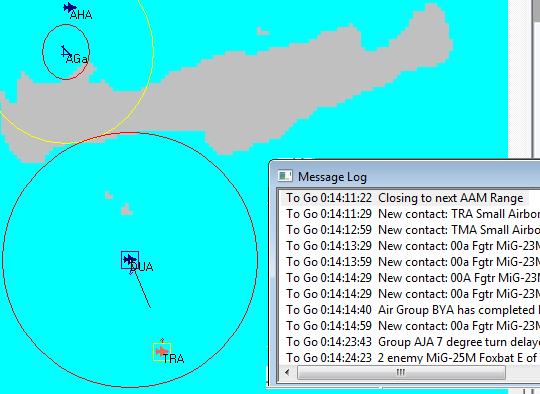
That's a first one too, or is it just me? > Closing to next AAM range Vow! Where have you been all this time?? I order DUA to attack TRA, which judging from their cruise speed is a pair Fishbeds. DUA is already in AMRAAM range when I issue the order so weapon selection pops up, but I do not want to waste AMRAAMs on Fishbeds, so I ... I think I deallocated the AMRAAMs and then hit Cancel (?) or Execute (?). Lo and behold TRA logs "Closing to next AAM range" and vectors for TRA to attack with Sidewinders. Has this been introduced recently? I'm playing 2009.095. I was so much longing for this feature but this has never worked before. What did I do right this time? Have mercy, tell me!!
-
Enrique I've just watched the Storozhevoy Mutiny episode of "True Legends" on Discovery, it made me click that I've seen this name somewhere already ... hmm ... it is so familiar but where? But of course, Enrique's scenario!! :D Gonna need to load it at least, just I misplaced my historic db again. BTW the episode depicted the end of the mutiny in a way that after a FAB bomb of a Brewer hit the rear deck of the Storozhevoy some seaman changed their mind (about dying for it) and let the Captain out of the sonar room. The Captain then confronted Sablin and shot him in the leg. (There was an interview with, I understand, one of the seamen.) Also, not only the mutineers were discharged, but everyone, including the Captain and even those who originally alerted the shore.
-
-
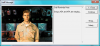
Cool. And just where do you get Toolbox version 1.1.4 from? C'mon Don, upload it! Idea for Don: how about adding a Staff Note event too? Just before the join event, to have SA pop up, saying: Creates a fully integrated look&feel for the DLL expansion, plus might even be useful to Show/Select/1:1 the merged group.
-
-
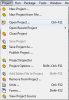
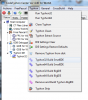
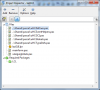
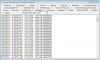
This post is intended as a STOVL rocket booster for programmers who are looking at starting out with the CodeTyphon IDE, like myself, e.g. to shorten the time you can get airborne and start to build your own ExportDLL code. ExportDLL is an API for HCE that Tony generously provided, right now he is working to enable access to the Harpoon Events which as he put it is the soul of them game and will enable the self proclaimed programmers to try their hands on modding Harpoon. The recommended programming tool is for ExportDLLs is CodeTyphon, a free Pascal based public IDE. Here I'm sharing my baby steps with it buildling an ExportDLL, that is installing CodeTyphone and then building the LazGUI.dll, the ExportDLL feature demonstration Tony provided. All I did so far would not take more than 30 minutes, now that I did it once, yet I spent many hours over several days figuring out what's what and goes where. I hope to spare few minutes for fellow enthusiasts, I'm sure I'll spare myself hours if I ever going to need to rebuild the IDE. I also hope that some of the experienced craftsmen will drop in here to show us how to do it better, faster or more elegantly. First the basics about ExportDLL, Tony's original announcement, must read topic: http://harpgamer.com/harpforum/index.php?/topic/2190-exportdlls The CodeTyphone programming tool info on the HarpGamer files section is here however you better download the current version directly from the CodeTyphone site: http://www.pilotlogic.com/sitejoom/index.php/wiki/84-wiki/codetyphon-studio/80-codetyphon-download Once you got the 500Mb install zip, extract it and run the install.bat script from under the extracted CodeTyphonIns folder. This will install the CodeTyphon Control Center (CTC) and lot of source files. Next you build the IDE and Pascal compiler, start CTC and then select Menu > Typhon > "Typhon32 Build SmallIDE". This will take some time, CTC cross compiles the IDE and the Pascal compiler from the source. I'm not sure about SmallIDE vs BigIDE, what difference it makes, but you must build a 32bit compiler for compiling ExportDLs. Download the ExportDLL files library from Tony's cache: https://tarzan.tgp.net:8443/svn/StratsimsOSS/HC/shared/pascal/trunk I place them under: "C:\Matrix Games\Code\Shared\pascal", you will need to set your project build parameters depending where you put these. The downloaded files are: There is a mathematical library included with pascal source, the trigonometric routines are used for navigational computing. Then there are uHCDefines.pas, HCE DLL interface constant definitions uHCEventHelpers.pas, two text conversion routines for HCE events uHCGCI.pas, navigation routine to calculate lattitude, longitude coordinates uHCGlobals.pas, some more constants uHCTypeDefs.pas, this is the main event, here you find the type definitions for the HCE data possible to access through DLLs Download the LazGUI example https://tarzan.tgp.net:8443/svn/StratsimsOSS/HC/ExportDLLs/lazGUI/trunk/ I place the files under: C:\Matrix Games\Code\LazGUI Tony has just updated the example to latest standards so you should get the 2009.088 GE for the DLL to work as intended. Now there is the lazGUI.lpi file, this is the project information file that stores compiler options and also the path to the different source files needed for the build, it is in XML format. I'll need to modify it to match the folders where I have the sources on my computer. As I'm not familiar with the IDE e.g. where, under which menu to change project/compiler options I'm editing the XML directly. (Anyone experienced with the IDE is welcome to tell how to do the following properly.) Looking into the XML I see that The HCE directory is defined as "D:\Games\HC", e.g.: <WorkingDirectory Value="D:\Games\HC"/> On my PC this is "C:\Matrix Games\HUCE.2009.088" so I'm replacing these strings in the XML. Required packages come from dir "..\..\shared\pascal", e.g.: <Filename Value="..\..\shared\pascal\uHCDefines.pas"/> I replace all these with "..\shared\pascal" to match my arrangements. This seems to be all. Now start the IDE. > Typhon32. from the Start menu. Open the LazGUI project, Menu > Project > Open project Select the lazgui.lpi file from where you put it, my case "C:\Matrix Games\Code\LazGUI". Looks ok, the Project Inspector shows all files and none are removed when I tell it to remove non-existing ones. So, here it goes Menu > Run > Build Like a cinch. And there is a shiny new LazGUI.dll under "C:\Matrix Games\HUCE.2009.088\ExportDLLs" Works too, starting HCE I get the ExportDLL bonus window: Now you are ready to add your own code. Interesting readings to start with: http://wiki.lazarus.freepascal.org/Lazarus_Faq http://wiki.lazarus.freepascal.org/Object_Pascal_Tutorial http://lazarus-ccr.sourceforge.net/docs/lcl/index.html http://wiki.lazarus.freepascal.org/LCL_Components#Standard_tab Don's Toolbox, an actual ExportDLL implementation http://harpgamer.com/harpforum/index.php?/files/file/809-toolbox/