

Skip to content
View in the app

A better way to browse. Learn more.

HarpGamer

A full-screen app on your home screen with push notifications, badges and more.

To install this app on iOS and iPadOS
  1. Tap the Share icon in Safari
  2. Scroll the menu and tap Add to Home Screen.
  3. Tap Add in the top-right corner.
To install this app on Android
  1. Tap the 3-dot menu (⋮) in the top-right corner of the browser.
  2. Tap Add to Home screen or Install app.
  3. Confirm by tapping Install.

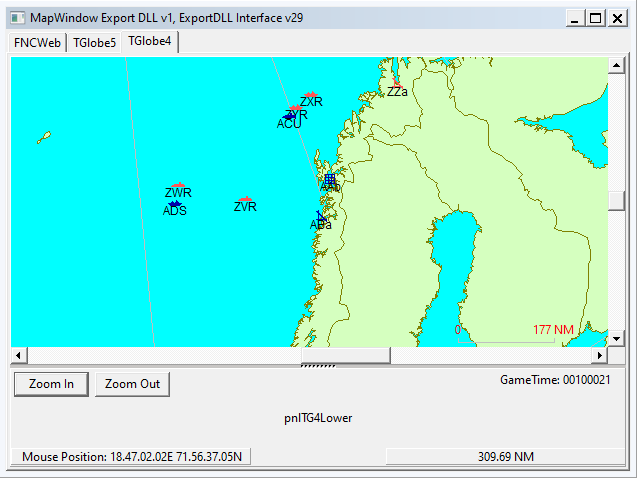
MapWindow 015

1 Screenshot

HC ExportDLL to provide a globe map interface
2022-07-07

Purpose:
To provide a globe view of the world to allow global reach during
 scenarios and BattleSets.

Original Author:
 Anthony Eischens

Contributors:

Compiled with:
 Lazarus 4.6

Third party controls:
 Stratsims OSS shared pascal code
  https://tarzan.tgp.net/svn/StratsimsOSS/HC/shared/pascal/trunk
 Stratsims modified TGlobe 4

License:
MIT (see License.txt) 

What's New in Version 006

Released

MapWindow 20230622 2023.001+
 Incremented DLL Version to 6
 Recompiled with updated shared HC pascal code
  to fix display of missile groups.

With version 006:

Account

Navigation

Search

Search

Configure browser push notifications

Chrome (Android)
  1. Tap the lock icon next to the address bar.
  2. Tap Permissions → Notifications.
  3. Adjust your preference.
Chrome (Desktop)
  1. Click the padlock icon in the address bar.
  2. Select Site settings.
  3. Find Notifications and adjust your preference.