TonyE
Staff Pukes
-
Joined
-
Last visited
Everything posted by TonyE
-
Can you post a screenshot of your monitor layout and list the resolutions? If you are handy with the registry, I'd love to see a zipped .reg file of HKEY_CURRENT_USER\SOFTWARE\Matrix Games\HCE so that I can take a look at the window positions saved. Thanks for posting! I'm sure you aren't doing anything wrong, 2021.005 fixed a longstanding issue with windows being sized incorrectly and it sounds like that is some logic that needs further tweaking. So an example from a machine here: Monitor 1: 1600 x 1200 100% scaling Monitor 2: 2560 x 1600 100% scaling - This is marked as the main display

-
until
Come chat with TonyE and whomever else appears. Bring your questions and interests. https://us02web.zoom.us/j/89801969642?pwd=T3pGUGsvejVSenFnMWxjNW8zTm1Kdz09 -
until
Come chat with TonyE and whomever else appears. Bring your questions and interests. https://us02web.zoom.us/j/89257671387?pwd=ajJ4NEtuSCsvNkNsQm1uWCttS1I5QT09 -
Eric finally got me over the weekend to revisit how the game sizes windows. I had re-worked the logic in 2013 and since then haven't really understood why as players we continued to see windows get cut off, the Formation Editor platform list dialog not showing any buttons for instance (since the window was drawn too narrow so the buttons were invisible). That has now been fixed in 2021.005. https://harpgamer.com/harpforum/topic/29035-current-files/ . My 2013 code was good right up until I did a logical AND instead of a logical OR. That foiled my attempt to have the window restoring code skip the size, only restore the left top corner position and let Windows manage the size of the window. Wrong: SWP_NOZORDER & SWP_NOSIZE, Right: SWP_NOZORDER | SWP_NOSIZE. Eric, your pain and frustration had some positive effect! This will save countless players a similar experience. A couple of more notes which are also summarized in the ReleaseNotes.txt file... The game still thinks it lives in a single monitor world whose upper-left corner is at pixel position 0,0. Myself and many (most?) of you run on multiple monitors, some of which have different scaling factors. The game prefers to run on the primary monitor but I regularly successfully run it on non-primary monitors, some of which have negative pixel positions. However, that is not always a great experience as some of the game dialogs insist on opening on a different monitor than the main game window. If you are suffering mightily with such constraints, let us know and we'll consider re-prioritizing teaching the game about multiple monitors.
-
HCE - 2021.005 - 2021-02-23 =========================== - Chg:00000 GE Dialog window sizes should finally not be saved. Only their positions are saved. This is for the formation editor window, map position picker, etc. Also improved the logic for putting windows in a visible location on screen, not just sizing the windows large enough to see the buttons. Friendly reminder, the game functions in multi-monitor configurations but it really isn't multi-monitor aware so you will find some dialogs will always open on your primary display (negative screen coordinates don't get along super well with the game).
-
The first function of the new launcher is just starting to work, the auto-updater so that the launcher can install new versions of itself. The second feature for the first release is strangely enough to be able to launch the game. That hasn't been implemented yet so no build for you all to test quite yet.

-
-
Backward compatibility so that existing BattleSets and databases work? Yes. That is where mapping tables are so important Adding new annexes? Yes. That is not an initial goal when it comes to deciding if satellites are aircraft should go in a new annex, this becomes important. Said 7-yr old from the initial post is going to be learning orbital mechanics with me this Spring so we need a place to apply that knowledge.
-
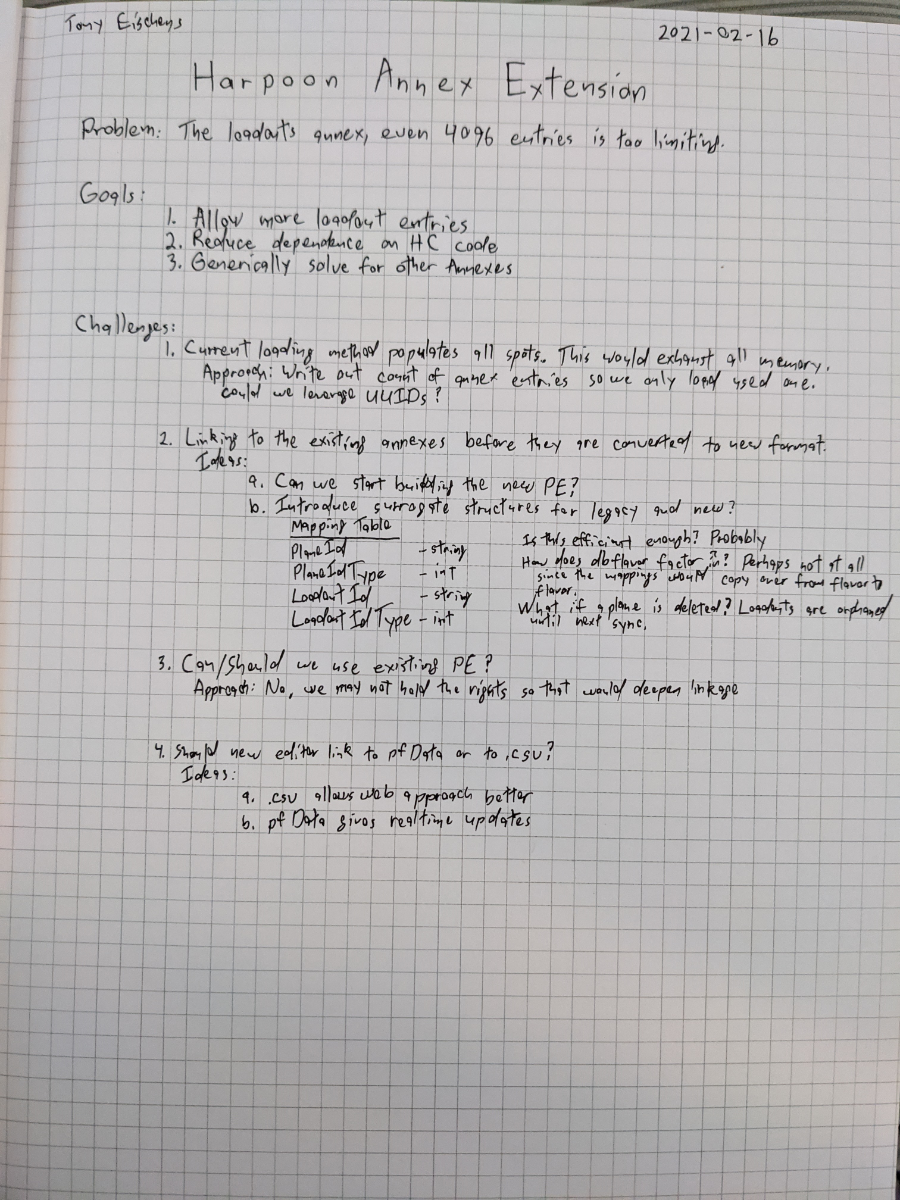
My final birthday present for the year came in last week, a book of graph paper which I put to work today when keeping the 7-yr old company and sketched out thoughts on expanding the 4096 items per annex database limits. This is the culmination of at least a decade of pondering the topic. The core question comes down to, "How do we blow away the limits while reducing dependence on code we don't own?" As I continue designing, I'll update this thread. For now, a photo of the page of notes.
-
-
HCE - 2021.004 - 2021-02-12 =========================== - Chg:00000 GE In commondb BattleSets, if a platform image reference is beyond the bounds of platform images in commondb.rsr, show a blank grey rectangle instead of erroring out of the program. (thanks divefreak) - Chg:00000 SE In commondb BattleSets, if a platform image reference is beyond the bounds of platform images in commondb.rsr, show a blank grey rectangle instead of erroring out of the program. (thanks divefreak)
-
HCE - 2021.003 - 2021-02-07 =========================== - Chg:00000 GE Fixed an omission in 2021.002 that had some wrong BS_STRINGS limits for earlier versions of the structure.
-
Accomplished 2021.002 Implemented: Wire up the plumbing so that runway size descriptions flow into the game from the PE and vice-versa. In the process, expand capacity from 8 to 128 runway types each up to 32 characters from 16 characters.
-
Hmm, actually hard to believe but it looks like all of the buffers were long enough to handle the increase from 16 to 32 character max length of runway size descriptions. 2021.002 should be good in that regard!
-
Allrighty, 2021.002 posted! Broncepulido, your comment does trigger me to mention that I fully expect long runway length names to result in some buffer overflow errors. I'll hopefully squash them for 2021.003. It is up to the DB author to include the length in the runway size name if they so desire.
-
HCE - 2021.002 - 2021-02-05 =========================== - Chg:00000 PE pfBuild, pfData Changed DB Property "DataVersion" from 5 to 6 given the below structural changes for passing runway sizes from PE to commondb.res/GE and back. Max of 128 runway sizes, 32 characters each including the terminating NULL. - Chg:00000 PE pfData lRunwayType table, ID column constraint set to < 128. - Chg:00000 PE pfBuild cFileIO::BSStringsExport added RunwayString array. - Chg:00000 PE pfBuild cFileIO::BSStringsImport added RunwayString array. - Chg:00000 GE BSStrings RunwayString array added - Chg:00000 DU Updates to handle RESRSRStructureVersion == 5 - Chg:00000 GE Updated RESRSRStructureVersion to 5 from 4 - Chg:00000 GE Added constants OLD_MAX_RUNWAY_SIZES = 8 and OLD_RUNWAY_STR_SIZE = 16 and proliferated them in the code. - Chg:00000 GE Note that a runway cannot be reduced to a length less than the fourth runway size entry which historically has been STOL.
-
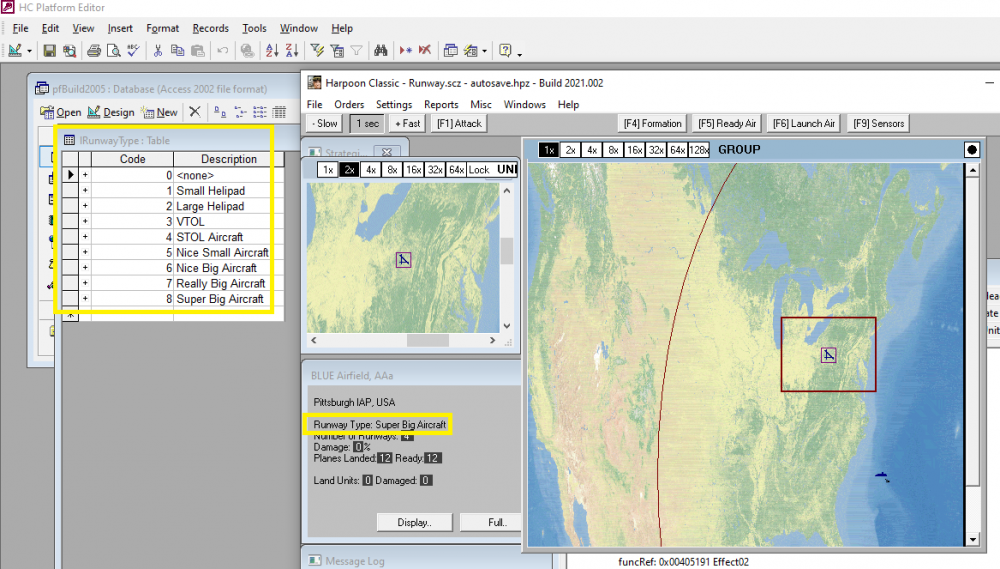
Completed today unless I find any last-minute bugs. Note that this is the ninth runway size indicating that more than 8 work. You can have as many as 128 runway sizes. No runway can be damaged beyond the 4th smallest size by hard-coded game rule. That has traditionally been the STOL runway size.
-
-
Thank you all for the thoughtful responses. I firmly believe the right route is to deny Rene's request for more runway sizes and apply the time and effort elsewhere. Naturally I'm implementing his request anyway. My ability to prioritize for the greater good still needs work! I'm crossing my fingers that more runways will lead to Rene's DB re-emerging sooner leading to the new BattleSet getting ready sooner, leading to more interested players that will need a launcher. From there it is only a few rainbows and unicorns to greatly increasing the database limits so Brad can run free with HCDBn. Can I say how great it is to get this much feedback!
-
I'm heavily leaning toward attempting to implement the greater number of runway sizes. I did some research into the code over the weekend and there is only one spot where we'll have to be creative with a rule and that is defining the minimum size of a runway (i.e. bomb a helo pad all you want and it'll probably still work as a helo pad).
-
While starting to lay out instructions for using windbg and gflags (from Memory problem debugging) I managed to see some heap corruption on a test machine then managed to get an error on my development machine. I've cleaned up an out of control Staff Assistant and no longer seem to get either of those problems. It may well not fix Jean's problem but it would be great if you can re-test with 2021.001 or newer. Thanks! https://harpgamer.com/harpforum/topic/29035-current-files/
-
HCE - 2021.001 - 2021-02-01 =========================== - Chg:00000 Beta installer will now show the UI page that allows changing the installation directory. (thanks eeustice) - Chg:00000 GE assign_group_id instrumented to log a message when all of the Group Ids are used up. It will show in ge.log. This was done to help troubleshoot lazTurncoat ExportDLL illegal Group Id assignment in a large scenario. - Chg:00000 GE fixed a few more places where country list was still limited to 255 entries. - Chg:00000 GE capped staff_warn messages at 32 before resetting the staff assistant.
-
Since throwing darts at the wall isn't getting us very far, though it was super fun to challenge those Flankers in the re-worked USNI BattleSet, I'm just starting to compile a list of tools and techniques to troubleshoot. Historically instrumenting the game code along with play testing would isolate issues but memory corruption tends to build up over time and can rarely be tracked back to a single event. Over the next few weeks we should be able to start using these strategies to identify memory issues and begin cleaning them up.
-
Assembling raw notes for debugging memory problems starting with heap corruption. Heap corruption WinDbg/glfags https://docs.microsoft.com/en-us/windows-hardware/drivers/debugger/ Win 10 SDK download https://developer.microsoft.com/en-us/windows/downloads/windows-10-sdk/ https://stackoverflow.com/questions/2470131/visual-studio-how-to-find-source-of-heap-corruption-errors
-