



Leaderboard
-
TonyE
Staff Pukes1Points5,091Posts -
donaldseadog
Members1Points1,458Posts -
eeustice
Members1Points386Posts



Popular Content
Showing content with the highest reputation on 09/13/2024 in all areas
-
I fast played to game limit but no vic conditions were awarded although checking conditions in scen edit I can't see why not.
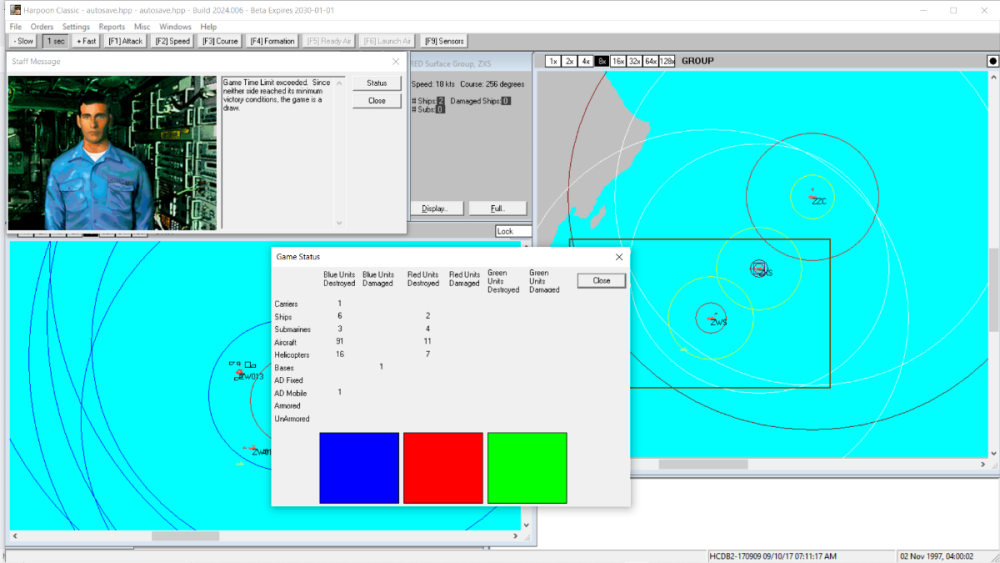 1 point
-
1 pointHCE - 2024.006 - 2024-09-04 =========================== - Chg:33611 GE Let AI submarine groups fire missiles against player ships again. AI should be able to fire missiles at 3/4 max range now instead instead of a range similar to their torpedo range. (thanks Enrique) https://harpgamer.com/harpforum/topic/33611-ia-submarines-dont-launch-anti-ship-missiles/1 point
-
1 pointI spent may hours sitting and standing in front of the SQS-26 console. It was also always comforting to hear the ping of the sonar at night in our berthing compartment. I even got to go inside the sonar dome when we were in the shipyard. It was huge!1 point
