



Leaderboard
-
broncepulido
Members2Points3,468Posts -
donaldseadog
Members1Points1,458Posts


Popular Content
Showing content with the highest reputation on 07/24/2024 in Posts
-
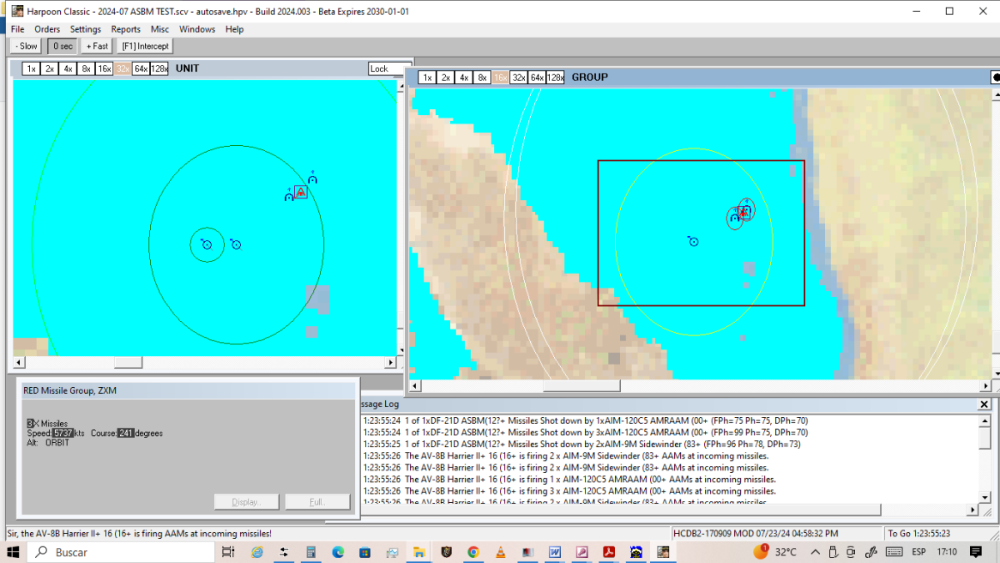
But not! The AMRAAM and Sidewinder are shooting down ASBM in ORBIT in the latest test. In other cases very probably the Harriers were in bad position to catch the ASBM with its missiles, because speed/aspect issues. Clearly showed in the Message Log window (test scenario changed to put Harriers in better interception position):
 1 point
-
AMRAAM launched at incoming DF-21D ASBM are inserted in ORBIT height:
 1 point
-
I read recently about the Pitch Black exercises, some of the USA participants had just arrived in Darwin.1 point
-
0 pointsAs consequence of the great and recent "Coral Sea 25" I did observe a little strange behaviour. To analyse it I scripted a little ASBM (anti-ship ballistic missile) scenario, settled in The Middle East IOPG theatre (Red Sea). Basically the problem is, when launched ASBM against the USN surface group, the Burke-class DDG correctly launches only SM-3 against the incoming orbital missiles, as they are capable of shooting down incoming missiles at orbit height, but not the SM-6 or SM-2, as its maximum ceiling is Very High. But the Harriers are launching against the incoming missiles its AMRAAM and Sidewinder, uncapable to reach orbit height!!! (only High or Very High capable). Also, I observe the AMRAAM and Sidewinder, inmediatly after his launching, dissapear of the screen (probably because are incapable to sustain orbit height!), but are inutily expended!!! 2024-07 ASBM TEST.zip0 points

