Skip to content
View in the app

A better way to browse. Learn more.

HarpGamer

A full-screen app on your home screen with push notifications, badges and more.

To install this app on iOS and iPadOS
  1. Tap the Share icon in Safari
  2. Scroll the menu and tap Add to Home Screen.
  3. Tap Add in the top-right corner.
To install this app on Android
  1. Tap the 3-dot menu (⋮) in the top-right corner of the browser.
  2. Tap Add to Home screen or Install app.
  3. Confirm by tapping Install.

Leaderboard

Popular Content

Showing content with the highest reputation on 11/03/2023 in Posts

  1. Thanks much Don, I'm hoping to finally take a good look this weekend.
  2. I went back to Katlin k/1, cleared mag and added 25mm cannon. Good in csv (item 303) but in GE get RGB-10, wep id 22543, which doesn't seem to appear in a ship class anywhere near Katlin k1. So no 'rule'. Hanging up the towel for a while.
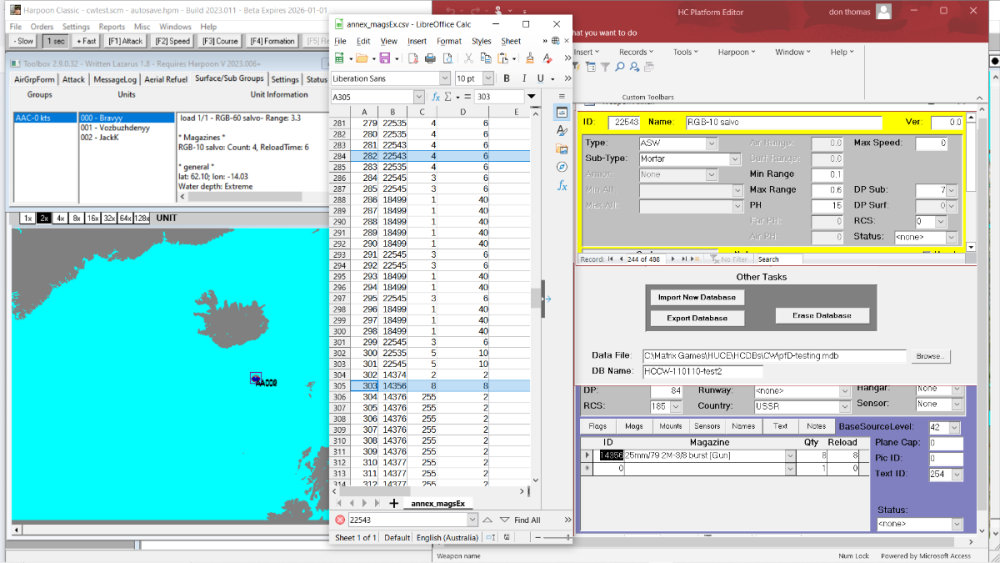
  3. Time for bed, I'm getting a feeling the csv file is OK (it took a while to work out for each class the order of mag items in the csv is reverse to the PE). The move to the commondb file is getting the number of items right but messing up if the first is deleted or overwritten. I'll look tomorrow at what happens when simply adding items

Account

Navigation

Search

Search

Configure browser push notifications

Chrome (Android)
  1. Tap the lock icon next to the address bar.
  2. Tap Permissions → Notifications.
  3. Adjust your preference.
Chrome (Desktop)
  1. Click the padlock icon in the address bar.
  2. Select Site settings.
  3. Find Notifications and adjust your preference.