




ToolboxV.zip is for the matrix last release 2022.027.
Toolbox version 2.11+ requires GE version 2025.017 + and runs best in the 2025,025 release available here on Harpgamer
Note these install instructions which differ slightly for the different GE versions.
Your downloaded Export.DLL for Harpoon Classic is easily installed.
For Toolbox v 2.11 in game versions 2025.017 + you should create (if not already) a folder in the games standard ExportDLL folder and name it 'GE'. Then simply unzip your package into there with the toolbox.dll in the GE folder.
To disable toolbox simply move it to another folder (other than ExportDLL) or rename the file type to eg Toolbox.dllbck
For ToolboxV in game version 2022.027 unzip into the ExportDLL folder, no GE subfolder is needed.
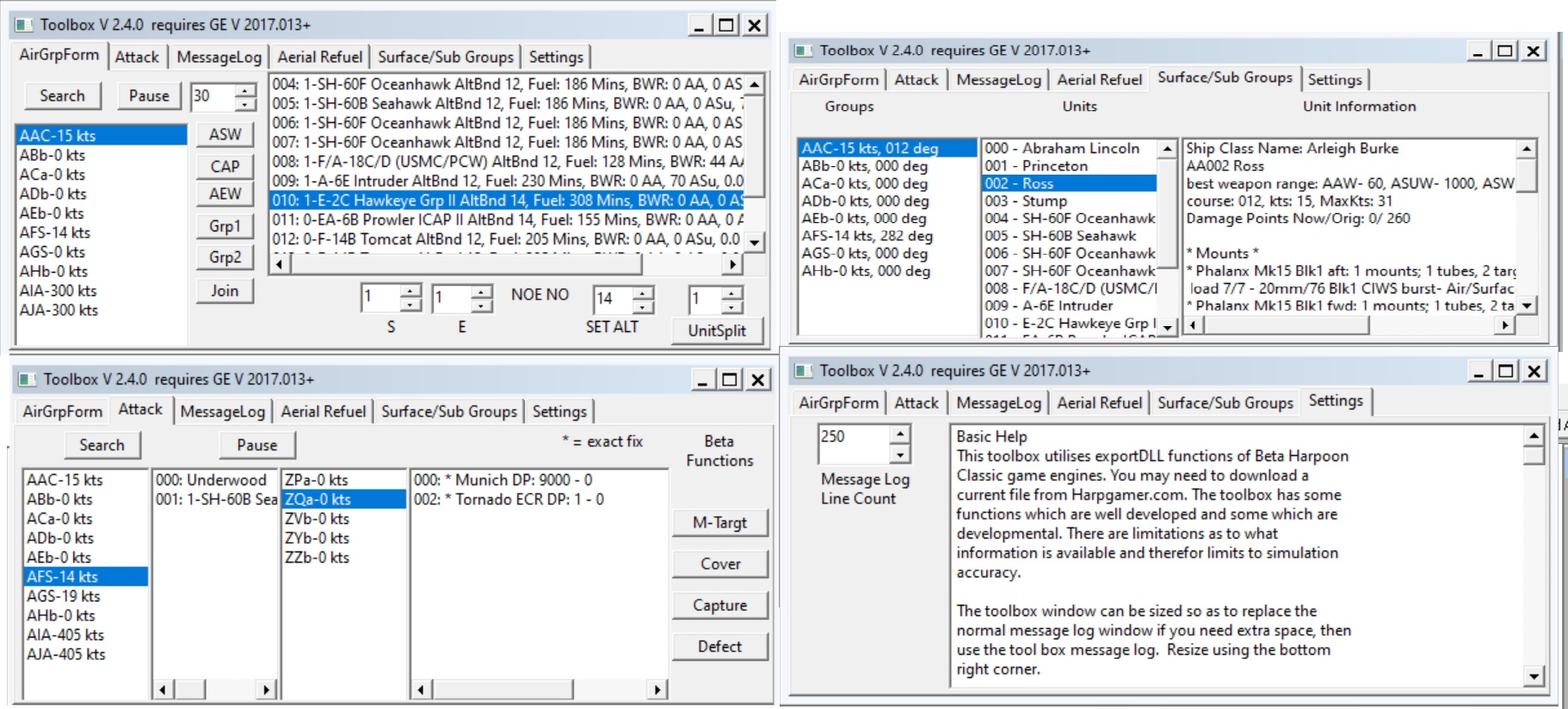
This tool provides a window which resides in the Harpoon game window providing tools for:
manipulating air units formations within groups;
edit two air group's courses for joining;
in flight reassignment of missile targets;
deploying air groups exactly over known position of enemy unit;
capturing enemy groups;
and duplicating the message log window (so that it can replace the message log window for screen space saving).
It provides some game status information not available in the game including information on the loaded scenario, detailed list of destroyed assets and damaged assets and any victory conditions that have been met.
Attacking Neutral Penalty
Toolbox keeps track of attacks launched by the player and if any target a neutral asset (including if the asset is shown as unknown side) the player is penalised by the attacked group changing to enemy and if the attack is launched from an air group, that group will change to neutral (and RTB at bingo) so to be unavailable in short term for further action.
In most pages of toolbox player groups are selected if they are currently selected in the game. The selection can be overridden with normal mouse selections.
AirGrpForm window:
The "Search" button brings up a list of all current players groups that include air units. By selecting one of the listed group its air units will list in the next box.
By selecting one of the units you can then edit the flight level of that unit or give it an offset from the group centre position. The offset is approximately nautical miles and a combination of N/S (+is south) or E/W (+is east). If the group is in the unit window you should see the shift instantly. There is an idicator for if the unit is NOE capable or not.
To cause two air groups to join select one group in the group window and press one of the 'Grp' buttons (or use right mouse click popup menu), the group ID will be shown,then select the second group and press the second 'Grp' button, finally press the 'Join' button. The groups will be vectored to meet and join.
ASW, CAP, EW and AEW - To add a hexagon based patrol select an air group, select a non zero base size (approx NMs) then press the appropriate button ASW low alt (vlow if capable), CAP medium alt with 1 in 5 min intermittent radar and AEW at highest alt capable with 1 in 10 min intermittent radar, EW like AEW but 2 1/2 in 3 min radar. If the selected group already had a course set then the patrol will be centred on the first course point, otherwise it is centred on the groups current position.
If the group already has a multi leg course (no in course orders other than the last leg eg RTB) and the patrol size is set to zero then the course remains and the legs are populated with the loiter/hover and cruise orders plus radar as per the hex patrols.
Pause will pause the AI but still allow some game interaction, eg move game focus.
Attack window:
gives information on enemy units and groups that are visible to you. An asterisk (*) before an enemy unit name indicates that an exact fix is known. A group '00' indicated unknown size. Some experimental functions include an ability to reassign missiles' targets (if capable and in the correct guidance phase), attempt to capture certain enemy or neutral assets, 'defection' of groups and directing a group to move exactly directly over the current known position of an enemy unit (or centre of uncertainty zone if no exact fix exists).
Air Refuel window:
This adds versatility to the already good GE refueling ability. You can set the toolbox to automatically pause the game as refuel events are queued by the main program and bring up the event information. You can bring up a list of all your groups for which refueling is current and select a group to show its units' and refueling information. You can also search for a list of Air Groups that include a tanker.
Two 'manual' refueling tasks are available to supplement game refueling, you can manually "Queue" a new refuel cycle for the whole group and select the refueling unit if there are more than one (like alt+R in game but you can select which tanker unit refuels). You can also refuel tanker units from other tanker units in the group or transfer fuel internally of a tanker unit (so as to use refuel store to increase the tankers range or in reverse so as to use some of the tankers fuel for refueling). Single units can have stipulated amounts of fuel transferred without starting standard refuel cycle, so you can refuel high unit # units without waiting for the whole group to be refueled, handy if you have just joined low fuel units to a large group. In the unit information window there is information to help you estimate your refueling needs: unit endurance in minutes, unit range at current speed in nm, unit estimated range if it is split off from the refuel group (and may have a cruise speed high than the refuel group) and the nominal max range (at normal cruise speed) of the unit. The last two 'range' values allows you to estimate how much fuel can be taken up by the unit while in the refuel group.
Groups window
this provides information about units in your various groups.
Munitions window: gives a tally across mutliple sessions of the same scenario of the expenditure of your munitions, both total and aircraft only (tallied for each AC home unit).
Status Window includes four pages for Loaded game and scenario information, victory conditions achieved, damaged unit list and dead unit list
Settings window: gives instruction on using toolbox and a setting for the number of lines to show in the message window, which reproduces the in-game messages so that if you wish you can delete the std in game messages for more space.
Includes summary of handy short cut key commands.
To use the program unzip the ToolBox.dll file into the exportDLL folder of your HCE installation. For 2025.001+ GE versions install in a ExportDLL subfolder named GE. To uninstall simply move or delete the file.
The program utilises 'LazGUI.dll' code by Tony Eischens and adapted by Don Thomas.
Please direct any queries or bug reports via Harpgamer.
2175
What's New in Version 2.10.3
Released
NEW for ver 2.10
Various groups and units in toolbox windows are selected by the current selection in the GE.
The selection in toolbox can be overwritten by normal mouse click etc.
AirGroupFormation page: The AC group patrols are added to the popup menu.
The assignment of an AC group to Grp1 or Grp2 remains until reassigned or two groups are sent to 'join'. This with the selection of AC group in toolbox by selection in GE allows quicker assignment an reduces the need to clearly read group IDs.
The 'Join' command no longer need Grp1 to be moving, if it is at loiter/hover throttle it will go to cruise and vector of to meet Grp2.
Air Refuel Page: A popup menu is added in unit window for assigning units for internal transfer of fuel in Tankers between their main tanks and IFR fuel cells and for supply tanker and recipient units. Fuel quantity must still be entered.
If the group currently selected in the GE is listed in the IFR Group window it will be highlighted and it's units brought up in the unit window.
Groups Page, added more information for AC units in the unit details window. Groups will be selected and highlighted and their units brought up in the units window if selected in the GE.
Attack page, friendly and enemy/neutral displays are now 'searched' separately. Friendly groups selected in GE will highlight and select in toolbox, enemy units selected in GE will have the unit and it's group selected in toolbox depending on it's contact quality.
This allows EG if prosecuting a sub contact with a helo group, in the GE select the Player Helo group and the enemy unit, these will be selected in toobox and mouse press the 'Cover' button will send the helo group to the current known or centre of proximity quadrant position of the sub.
- 09/26/2025 10:58 AM
-
2.11
-
2.2.0.1
-
2.1.0.1
-
2.11.03
-
2.11.01
-
2.10.7
-
2.10.6
-
2.10.4
-
2.10.3
-
2.9.6
-
2.9.5
-
2.9.4
-
2.9.4
-
2.9.3
-
2.9.2
-
2.9.10
-
2.9.4
-
2.9.0
-
2.8.0
-
2.6.0.1
-
2.6.0.1
-
2.5.0.10
-
2.4.2.1
-
2.3.3.8
-
2.3.3.8
-
2.4.0
-
1.13.1.2
-
1.13.0.1
-
1.12.2.7
-
1.12.0.2
-
1.11.0.5
-
1.9.2.2
-
1.9.2
-
1.7.0.2
-
1.7.1
-
1.6
-
1.5.2
-
1.6
-
1.5.2
-
1.5.1
-
1.4.1
-
1.3.3
-
1.3.2.1
-
1.3.2
-
1.3.1.2
-
1.3.1
-
1.2.6
-
1.2.5
-
1.2.4
-
1.2.3
-
1.2.2
-
1.2.1
-
1.2.1
-
1.2.0
-
1.1.3
-
1.1.2
-
1.0.1
-
1.0.0
-
1.0.0