

Skip to content
View in the app

A better way to browse. Learn more.

HarpGamer

A full-screen app on your home screen with push notifications, badges and more.

To install this app on iOS and iPadOS
  1. Tap the Share icon in Safari
  2. Scroll the menu and tap Add to Home Screen.
  3. Tap Add in the top-right corner.
To install this app on Android
  1. Tap the 3-dot menu (⋮) in the top-right corner of the browser.
  2. Tap Add to Home screen or Install app.
  3. Confirm by tapping Install.

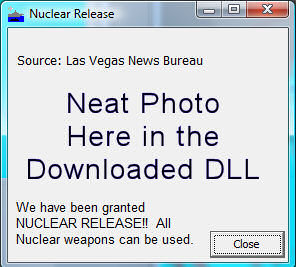
ExportDLL - Nuclear Release Dialog

1 Screenshot

NuclearRelease.dll interface version 1, for GE 2009.010+


Shows the player an alternate dialog when nuclear release is granted. There is no disrespect or undercutting of the seriousness of nuclear warfare intended with this lighthearted presentation.


Installation:

Extract the DLL to the ExportDLLs folder of your HCE game, then restart the game.


History:

02: 2009/02/14 Fixed messed up DLL description.

01: 2009/02/14 Initial release.

What's New in Version 02/15/2009 01:22 AM

Released

No changelog available for this version.

Account

Navigation

Search

Search

Configure browser push notifications

Chrome (Android)
  1. Tap the lock icon next to the address bar.
  2. Tap Permissions → Notifications.
  3. Adjust your preference.
Chrome (Desktop)
  1. Click the padlock icon in the address bar.
  2. Select Site settings.
  3. Find Notifications and adjust your preference.