Tools/Mods/Docs
Tools, Mods, and Documentation for Harpoon Classic
41 files
-
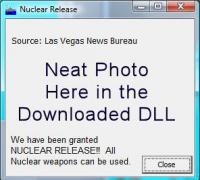
NuclearRelease.dll interface version 1, for GE 2009.010+
Shows the player an alternate dialog when nuclear release is granted. There is no disrespect or undercutting of the seriousness of nuclear warfare intended with this lighthearted presentation.
Installation:
Extract the DLL to the ExportDLLs folder of your HCE game, then restart the game.
History:
02: 2009/02/14 Fixed messed up DLL description.
01: 2009/02/14 Initial release.
- 346 Downloads
Updated -
ZIP file containing MS Word and PDF versions of the orders for the battleset.
The table of contents links work in the Word document, they do not work in the PDF.
- 300 Downloads
Submitted -
Designed for use with post HCE 2008.43
I have created a mod for HCE which adds my own personal artwork in place of the stock icons in the game which makes them look slicker and more up to date.
Replace the GR_ICONS.BMP in "Matrix Games\HCE\Graphics" with the GR_ICONS.BMP file contained within the attached zip file, remembering to backup your original file should these icons not work as expected or be to your taste.
Enjoy
By Terry "Stalintc" Courtney
Comments are welcome
- 485 Downloads
Submitted -
Designed for use with post HCE 2008.043
This is a collection of sounds that I have sampled together to form a sound mod for HCE since we now have the capability to change such things.
Please extract the contents of the folder contaned in this .zip to your Matrix Games\HCE\Sound folder.
Please backup your sound files before you proceed to ensure that you can rollback to the stock sounds should you decide these are not for you!
Enjoy!
By Terry "Stalintc" Courtney
Comments are welcome.
- 491 Downloads
Submitted -
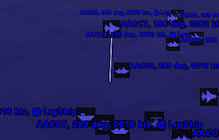
GoogleEarth.dll interface version 5, for GE 2009.042+
Runs a tiny webserver that serves a kml file to GoogleEarth on port 8183 to the local machine (and elsewhere if you do port forwarding).
Installation:
Extract ZIP with directories intact to your HC directory, the HCGoogleEarth.dll will end up in an ExportDLLs directory and a GoogleEarth directory will be created with each unit icon separated into its own file. See the Word document in the ZIP file for further instructions.
History:
01: 2007/09/28 Initial release that is HCE compatible.
02: 2009/02/10 Updated to be compatible with Google Earth 5.0. Also put subs underwater since Google Earth 5
supports that.
03: 2009/09/21 Allow connections other than LocalHost and changed from port 8180 to 8183.
04: 2009/09/22 Host unit icons at HarpGamer, further enabling connections from machines other than LocalHost
05: 2009/09/27 Implement zipping of the KML file to KMZ, results in much less network traffic.
- 772 Downloads
Updated -
DataDump1.dll interface version 1, for GE 2007.022+
Writes all of the exported data to HC directory in a file named datadump.txt which is over-written each time the game is loaded.
WARNING: The text files can get very large!
Installation:
Extract ZIP with directories in tact to your HC directory, the DataDump1.dll will end up in an ExportDLLs directory.
- 206 Downloads
Submitted -
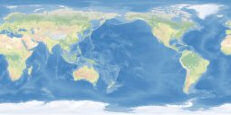
Map Texture file for the BattleSet Builder. To use this file in a default installation, go to
C:\Matrix Games\HCE\BSBuilder\map_img\
Rename your texture.tif file as a backup. Then download this file, unzip it to C:\Matrix Games\HCE\BSBuilder\map_img\
and it will be used when creating BattleSets in the BattleSet Builder.
The original graphic comes from http://www.shadedrelief.com/cleantopo2/index.html
All editing and sizing of the image was done by TonyE.
There is no restriction on use of this graphic, attribution is always nice, Tom Patterson made CleanTopo2, Tony Eischens made it work for HCE.
Big Caution - you may have difficulties getting a useable map from this with BS Builder versions before 2008.028. Contact me if you need the update in order to make use of this texture file.
- 855 Downloads
Updated -
- 791 Downloads
Submitted -
Undocumented on how to use but it will let you look thru huge text files such as multi-gigabyte HC logs
- 644 Downloads
Submitted -
This utility makes a single registry change.
In HKLM\SYSTEM\CurrentControlSet\Control\FileSystem
NtfsDisable8dot3NameCreation is set to 0
!!! You will need to restart your computer for the change
to take effect. !!!
!!! Uninstall HC after making this change, then
re-install the game so that the short filenames
are created !!!
Impact: Any future files written to NTFS volumes
have short filenames generated and stored in the
file system. This is the default setting and is
required for any reasonably complex 16-bit application
to run properly.
There could be a slight performance degredation if
the value was previous set to 1 but it is probably
imperceptible in daily use and as stated above, is
the default setting in Windows versions thru Vista.
- 283 Downloads
Updated -
Use this utility when you are troubleshooting problems running the game components. It grabs system information pertinent to running HC versions from Winharp onwards thru HCE. Once the information is gathered, send it on to someone who can analyze it and plan strategy.
- 429 Downloads
Updated -
Tested on 2007.000
Clears
HKCR\Software\Matrix Games\HCE\SE\Options
HKCU\Software\Matrix Games\HCE\Options
- 1,213 Downloads
Submitted -
Excel spreadsheet demonstrating the radar model in recent releases of the game, minus effects for weather, line of sight, etc.
- 613 Downloads
Updated -
HC Gold Platform Design Worksheets by Joe Lanza
updated by Jan Masterson
- 456 Downloads
Updated -
- 437 Downloads
Updated -
- 822 Downloads
Updated