




kmart494
Members
-
Joined
-
Last visited
Everything posted by kmart494
-
I am presently exploring using HTML, JS, and Open Street Maps for the next gen SimPlot. That would get you a world map, but not MGRS. I don't know much about MGRS, but I think it may be metric.
-
Thank you, Geof. I like the idea of eliminating the data movement. The original idea of the future/past waypoints was to facillitate the drawing of paths ahead of and behind a given unit. The replay feature had not yet been invented, so I was working with what I had when it did come along. FYI, internally SimPlot tracks units by a unique identifier called UnitID. It uses a letter followed by a three digit number. For example, the first surface ship created would be S001, then S002, etc. The idea of the Track Number came in version 2 when I wanted to create a realistic way of displaying unknown units. In the real world, all detected units are assigned a TN. That and the "domain" (air, surface, subsurface, space) are the minimum information that a commander can see. The UnitID is still a part of SP2, and probably should remain as the TNs for each side may have to be unique. More thought needs to go into it.
-
Geof, Internally, SimPlot runs on objects. All ships, planes, etc are child class objects of the Unit class. Even the waypoints are objects of a Waypoint class, with two object arrays for each unit: FutureWaypoints (set by players in the Waypoints window) and PastWaypoints. When a unit moves and reaches a FutureWaypoint, the waypoint is then moved to the PastWaypoint array, then movement continues until the end of the turn. At the beginning of every movement phase, if no waypoint exists at that location, a new waypoint is added to the PastWaypoint array so players may iterate through the turn-based replay later. This way, the app need not calculate where every unit was at a given time. Each waypoint has a "time stamp" on it. Maybe for database purposes, that would be good enough to have only one table of waypoints per unit? Kevin
-
I am curious about this approach. I haven't messed with databases in a long time, but my language of choice XOJO does support SQLite. Do you think the game would be run from database inquiries, or should the entire database be loaded at app start? One very significant problem with multiplayer games is data security. In SimPlot1, I used home-spun text files to store and transmit unit data to players. Turns out, players were looking into those files to get information they would otherwise not see. The current .spscn files are actually JSON files with a bit of encryption (so gentle I bet you can figure it out). Is was necessary to include ALL unit history to make the replay work correctly, even units that had only been "recently discovered". I would appreciate your insight into this matter. Kevin
-
Answered over at the Discord forum.
-
I take it you are using the latest version. If so, then I must apologize since I have had problems with the MacOS version, and there will be no further updates for SimPlot2. If you have access to a Windows computer, then I recommend trying that version. It is much more stable. Development of SimPlot3 will begin soon, so there is some silver lining to the cloud.
-
The background images were designed to be centered at (0,0) game coordinates.
-
I'm sorry to say that MacOS development for SimPlot has lagged behind the Win10 version due to Apple Gatekeeper issues. Therefore, you likely do not have the most recent version, which addresses the issues you are having. Do you have a Win10/11 computer to use? If not, I will try to update the MacOS version (no promises, though).
-
View File South China Sea This is a map of the South China Sea between Hianan, Vietnam, and the Philippines. There are no water depth levels on this map. Submitter kmart494 Submitted 04/26/2023 Category Maps
-
 This is a map of the South China Sea between Hianan, Vietnam, and the Philippines. There are no water depth levels on this map.
 -
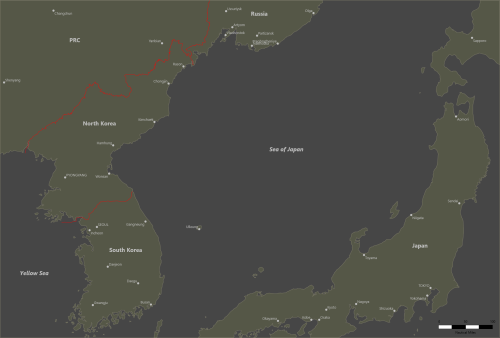 This is a map of the Sea of Japan. There are no depth levels available on this map.
 -
View File Sea of Japan This is a map of the Sea of Japan. There are no depth levels available on this map. Submitter kmart494 Submitted 04/26/2023 Category Maps
-
View File GIUK Gap with Depth Levels This is a map of the Greenland-Iceland-United Kingdom gap with 5 different depth levels. Submitter kmart494 Submitted 04/26/2023 Category Maps
-
 This is a map of the Greenland-Iceland-United Kingdom gap with 5 different depth levels.
 -
SimPlot version 2.3.3 is ready for download. Fixed: Problems loading MapMaker maps after saving and reloading a scenario. Units deleted but "Show as Sunk" would temporarily disappear.
-
Anything older than H4 were not created in pdf format. Larry has told me the file types of the original documents are not supported by modern software.
-
I made a video showing how to play a refereed double-blind game. Kevin Martell's YouTube Channel
-
I uploaded a new version of Harppon: Captain's Edition to the Vassal website. Version 1.1 - Requires Vassal Version 3.6.7 or later. Now can host up to 2 NATO and 2 Soviet players. Added graphics for depicting ship/aircraft sensor ranges. Added an Invisible trait to counters to support double-blind play. Added a Referee player to support double-blind play. All counters except missiles are on player-specific counter sheet windows. Flown aircraft will automatically return to the base Ready Aircraft box when the Next Turn button is pressed. Harpoon: Captain's Edition Vassal Module Example Solitaire Playthrough Example Head to Head Playthrough
-
A module for the classic 1990 game Harpoon:Captain’s Edition is now available for download. https://vassalengine.org/wiki/Module:Harpoon:_Captain's_Edition
-
Actually, the discrepency with the decimal place is internal to SimPlot. Many decimal values are truncated to a certain number of places, then cast as an integer value to be saved. This saves file space as Xojo will save too many decimal places in JSON. I forgot I had done that. The value in your file is correct. What's not correct is the drawing routine in SimPlot. It turns out that a background image from MapMaker was being drawn first, then the background fill is drawn. That "covers up" the image. The next release will have the fix. I might release it this weekend, but the unit formations are not yet tested.
-
I think I discovered the problem. Your map image has a scale of .353 pixels/nmi, but the json file shows 353 pixels/nmi. This will not render correctly in SimPlot. I will look at the source code to see where the app went wrong.
-
Is your raw picture in the same folder as the map json file? It should appear there if the checkbox is set True.
-
The formation ships will have to "teleport" to their new locations since I am not going to code a movement AI. I actually researched how ships move in a formation, and it is very complicated (also depends on the type of formation). I don't want to sped any time on that right now. The NTDS symbols can be adjusted using F9. Try different Symbol Scale or Symbol Size settings I will reduce the transparency down to 25% and see if that helps. Otherwise, I will have to turn it off.
-
Under the File menu there is a screenshot function. I am looking into ways to reduce the file size without sacrificing the data.
-
The unit's Track Number is a four digit number starting at a random point and incremented by one. The internal UnitId property starts at 001 and increments by one for each new unit. The UnitId is also prefixed by a letter indicating the type of unit. You can create units using a blank scenario and export them (Units/Export menu item). Send the JSON file to your friend. Your friend can then import the unit (using the Units/Import menu item). The UnitId and Track Number will be assigned at the time of importation.

