

Skip to content
View in the app

A better way to browse. Learn more.

HarpGamer

A full-screen app on your home screen with push notifications, badges and more.

To install this app on iOS and iPadOS
  1. Tap the Share icon in Safari
  2. Scroll the menu and tap Add to Home Screen.
  3. Tap Add in the top-right corner.
To install this app on Android
  1. Tap the 3-dot menu (⋮) in the top-right corner of the browser.
  2. Tap Add to Home screen or Install app.
  3. Confirm by tapping Install.

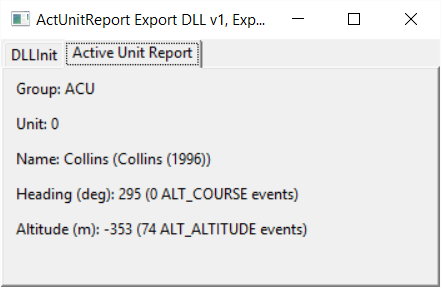
ActUnitReport 003

1 Screenshot

Show information about the ActUnitPtr unit.
To start, this means showing altitude, which the
HC Mini Report does not


Source code available via SVN at:
https://tarzan.tgp.net:8443/svn/StratsimsOSS/HC/ExportDLLs/ActUnitReport/trunk/

What's New in Version 003

Released

ActUnitReport 20230331 HC 2023.001+
  Incremented DLL to version 3
  Modified code to allow the ExportDLL to work
   with HC 2023.001+.  It will no longer work
   in earlier builds of the game.

Account

Navigation

Search

Search

Configure browser push notifications

Chrome (Android)
  1. Tap the lock icon next to the address bar.
  2. Tap Permissions → Notifications.
  3. Adjust your preference.
Chrome (Desktop)
  1. Click the padlock icon in the address bar.
  2. Select Site settings.
  3. Find Notifications and adjust your preference.