

Skip to content
View in the app

A better way to browse. Learn more.

HarpGamer

A full-screen app on your home screen with push notifications, badges and more.

To install this app on iOS and iPadOS
  1. Tap the Share icon in Safari
  2. Scroll the menu and tap Add to Home Screen.
  3. Tap Add in the top-right corner.
To install this app on Android
  1. Tap the 3-dot menu (⋮) in the top-right corner of the browser.
  2. Tap Add to Home screen or Install app.
  3. Confirm by tapping Install.

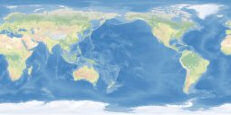
BB Texture - CleanTopo2

1 Screenshot

Map Texture file for the BattleSet Builder. To use this file in a default installation, go to

C:\Matrix Games\HCE\BSBuilder\map_img\


Rename your texture.tif file as a backup. Then download this file, unzip it to C:\Matrix Games\HCE\BSBuilder\map_img\

and it will be used when creating BattleSets in the BattleSet Builder.


The original graphic comes from http://www.shadedrelief.com/cleantopo2/index.html


All editing and sizing of the image was done by TonyE.


There is no restriction on use of this graphic, attribution is always nice, Tom Patterson made CleanTopo2, Tony Eischens made it work for HCE.


Big Caution - you may have difficulties getting a useable map from this with BS Builder versions before 2008.028. Contact me if you need the update in order to make use of this texture file.

What's New in Version 03/18/2008 06:09 AM

Released

No changelog available for this version.

With version 03/18/2008 06:09 AM:

Account

Navigation

Search

Search

Configure browser push notifications

Chrome (Android)
  1. Tap the lock icon next to the address bar.
  2. Tap Permissions → Notifications.
  3. Adjust your preference.
Chrome (Desktop)
  1. Click the padlock icon in the address bar.
  2. Select Site settings.
  3. Find Notifications and adjust your preference.