

Skip to content
View in the app

A better way to browse. Learn more.

HarpGamer

A full-screen app on your home screen with push notifications, badges and more.

To install this app on iOS and iPadOS
  1. Tap the Share icon in Safari
  2. Scroll the menu and tap Add to Home Screen.
  3. Tap Add in the top-right corner.
To install this app on Android
  1. Tap the 3-dot menu (⋮) in the top-right corner of the browser.
  2. Tap Add to Home screen or Install app.
  3. Confirm by tapping Install.

Surprises in the Pacific

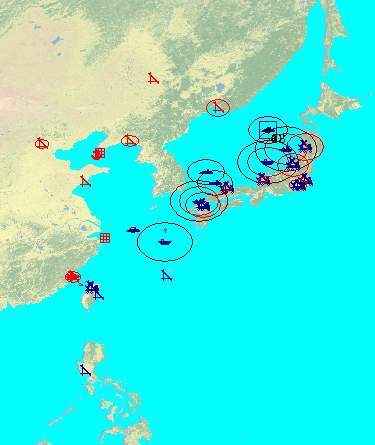
1 Screenshot

Surprises in the Pacific


Year 2015


You find Yourself in command of the Japanese and allied forces in a big struggle versus the PRC and North Korea.


Your forces are outnumbered and the Chinese bring in their latest inventory.


Russian intentions are unclear and unpredictable. If they join the war on China' s side it will

become extremely difficult to hold Japan and Taiwan.


Yet You are not defenseless. Both new Japanese through-deck carriers are in service. The big surprise for the enemy will be that these carriers actually carry modern F-35 fighter bombers.


So while you were caught off guard by the first hostile steps, You can strike back by using your brand new carriers and their modern combat aircraft.


You are in command of US air assets at Clark AFB, too. Several squadrons of first line bombers and fighter bombers are ready for counteroffensive actions.


Make it count.


Xmas 2010

Ralf Koelbach


Account

Navigation

Search

Search

Configure browser push notifications

Chrome (Android)
  1. Tap the lock icon next to the address bar.
  2. Tap Permissions → Notifications.
  3. Adjust your preference.
Chrome (Desktop)
  1. Click the padlock icon in the address bar.
  2. Select Site settings.
  3. Find Notifications and adjust your preference.