
David Ogea
Members
-
Joined
-
Last visited
Everything posted by David Ogea
-
View File Balearic Islands This map is centered on the Balearic Islands in the Mediterranean Sea and will be perfect for Command at Sea scenarios based on World War II or Spanish Civil War Submitter David Ogea Submitted 02/28/2020 Category Maps
-
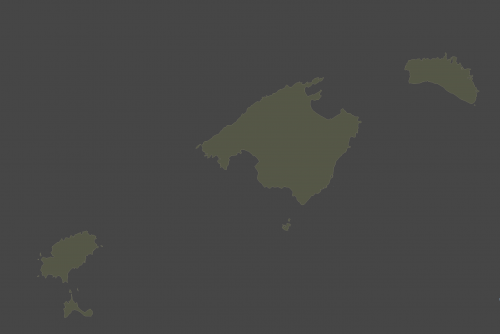 This map is centered on the Balearic Islands in the Mediterranean Sea and will be perfect for Command at Sea scenarios based on World War II or Spanish Civil War
 -
Ciao Kevin, I read about SimPlot2 in the Naval SITREP . Before that, I was using a tool called MoBo, but it wasn't really adapted to Harpoon and it required a lot of extra effort to manage games. SimPlot2 is really great . Can't wait to see the next versions coming. Cheers, David
-
File Name: Falkland Islands Map File Submitter: David Ogea File Submitted: 13 Jun 2018 File Category: Maps This is a map of Falkland islands to use with South Atlantic War. Enjoy Click here to download this file
-
 This is a map of Falkland islands to use with South Atlantic War. Enjoy
 -
Stupid me... Now that I use the right decimal character it works on both platforms Apparently, OSX is stricter than Windows on this one Thank you for the tip Cheers
-
Hi, Here is a bug I found with SimPlot2 on Mac OSX. I created a custom map for a Falklands scenario which covers Falkland Islands and the Argentinian coast. This map works well on a PC, but when I sent the .txt and the .png files to a friend using His Mac, he complained about SimPlot2 crashing. I tried to debug the map and found out that the problem was occurring when I had coordinates for more than one country, therefore, this works well on a Mac: MAP=Falklands1.png SCALE=2.4 COUNTRY=FALKLAND ISLANDS|128.25|-64.25 CITY=New Island|60.12|-60.50|T CITY=Port Stanley|191.12|-58.87|T CITY=Rio Gallegos|-239.88|-54.38|T CITY=Port San Carlos|147.75|-47.25|T CITY=Port Stephens|78.25|-83.50|T CITY=Hill Cove|104.00|-47.12|T CITY=Puerto San Julian|-183.84|83.59|T CITY=Primavera|-239.91|-120.47|T But this, causes SimPlot2 to crash: MAP=Falklands1.png SCALE=2.4 COUNTRY=FALKLAND ISLANDS|128.25|-64.25 COUNTRY=ARGENTINA|-231-50|82.00 COUNTRY=CHILE|-242-50|-104.50 CITY=New Island|60.12|-60.50|T CITY=Port Stanley|191.12|-58.87|T CITY=Rio Gallegos|-239.88|-54.38|T CITY=Port San Carlos|147.75|-47.25|T CITY=Port Stephens|78.25|-83.50|T CITY=Hill Cove|104.00|-47.12|T CITY=Puerto San Julian|-183.84|83.59|T CITY=Primavera|-239.91|-120.47|T You will find attached the original .txt and .png files. You may try them as is on a Mac, and it should crash SimPlot2, then, you may remove coordinates for Argentina and Chile, and it should work Hope it helps. Cheers, David Falklands1.txt