cdnice
Members
-
Joined
-
Last visited
Everything posted by cdnice
-
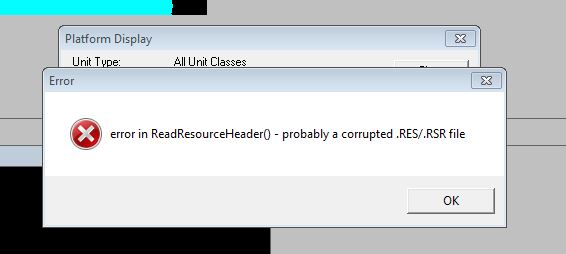
Hello, I copied the Melbourne to create the Bonaventure for Canada. I did not make any adjustments that I remember other than the country and the names. Attached pic of error for review. Thanks, Dale

-
Thank you, I will check that out.
-
Thank you, that was what I was looking for. In regards to the Halifax batch/flight II I was referring to the original plans to build them 9.4 metres longer so at their mid life refit they could be fitted a Mk41 VLS with RIM-161, APAR and SMART-L. I found reference to this plan at hazegray.org, global security.org and Wikipedia as well. https://en.wikipedia.org/wiki/Single_Class_Surface_Combatant_Project http://www.hazegrat.org/navhist/canada/current/futurddg/ http://www.globalsecurity.org/military/world/canada/hmcs-csc.htm
-
Ships missing names: #2053 Canada Mackenzie (80/1) DDE 264 should be Qu'Appelle #2053 Canada Mackenzie (80/1) DDE 263 should be Yukon #2054 Canada Restigouche (DELEX1) DDE 259 should be Terra Nova #2889 Canada Mackenzie (DELEX/1) DDE 264 should be Qu'Appelle #2889 Canada Mackenzie (DELEX/1) DDE 263 should be Yukon What is the criteria for having a platform added? I would like to see the Halifax Class Flight II FFG added, just want to know what is required. Thanks